Espresso Wedding Menu Card Template | Heritage Collection
$18.00
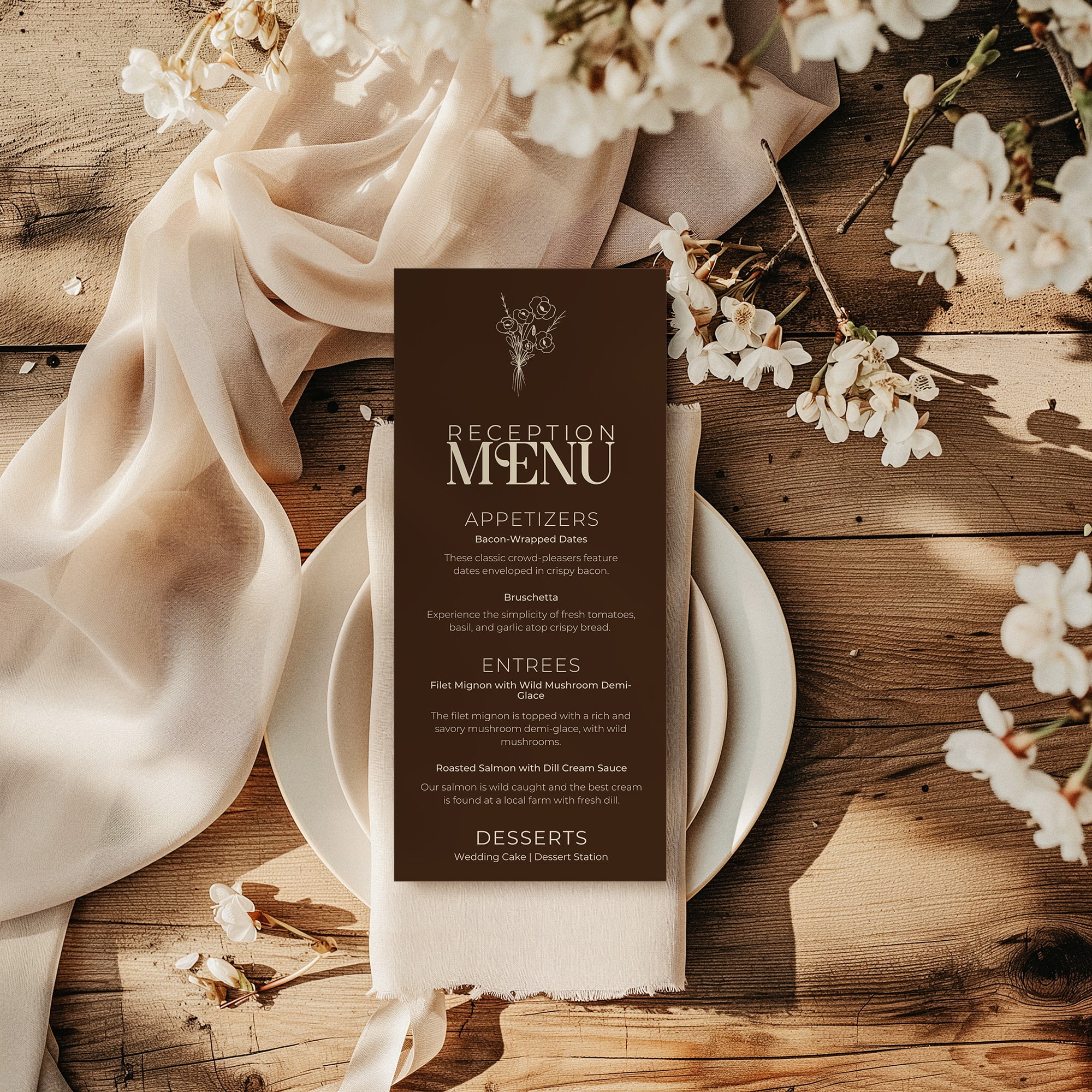
The Espresso wedding menu card template is a beautifully designed 4″ × 9″ wedding reception menu card from the Espresso Collection. Custom typography, fully editable in Canva — add your courses and print.
About Our Espresso Menu Template
The Espresso Wedding Menu Card Template brings rich espresso botanicals and moody, candlelit romance to every place setting, whether you’re planning a wedding reception, a bridal shower luncheon, or an elegant dinner party. Designed by an award-winning studio, this 4″ × 9″ menu card is part of a fully coordinated stationery system, so every detail feels intentional and cohesive.
What You Get
- One (1) 4″ × 9″ menu card template
- Instant download, a PDF with your Canva template link arrives immediately after purchase
- Fully editable text, add your courses, your names, your date
- Custom title lockup designed in Adobe Illustrator using licensed typography, not available in standard Canva
- 300 dpi, print-ready at professional print shops or at home
- Edit on any device with a free Canva account
The Heritage Collection Difference
Every Heritage Collection menu card features a custom-designed title lockup created in Adobe Illustrator using hand-selected licensed fonts with carefully chosen ligatures. These letterforms are exported as high-resolution PNGs and embedded directly into your Canva template, giving you the look of a custom letterpress design without the custom price. Your names, dates, and menu items remain fully editable.
Want the Complete Suite
This menu card is one piece of the Espresso Collection, a fully coordinated 10-piece wedding stationery suite including invitation, RSVP, details card, save-the-date, table numbers, place cards, welcome card, thank you card, and more.
See the complete Espresso Collection
Perfect For
Wedding receptions — coordinated with your full invitation suite
Bridal showers and rehearsal dinners
Elegant dinner parties, holiday gatherings, and special celebrations
DIY hosts who want professional-looking results without hiring a designer
Print at home, at a local print shop, or through Prints of Love
How it Works
Purchase and download your PDF instantly.
Click the Canva template link inside the PDF.
Make a copy of the template in your free Canva account.
Edit your menu items, names, and date directly in Canva.
Download as a PDF and print — or send to your printer of choice.
Product Details / Specifications
Size: 4 × 9 inches Format: Canva template (link delivered via PDF download) Resolution: 300 dpi — print ready Editable fields: Menu items, courses, names, date, event details Software required: Free Canva account Delivery: Instant download — PDF with template link
Frequently Asked Questions
What parts of the template can I customize?
You can edit almost everything inside Canva, including wording, fonts, colors, layout placement, and background colors. You can also upload personal photos or elements. The original artwork itself isn’t editable to maintain design quality.
Can I request a different size?
Yes. If you need an alternate size, simply reach out — I’m happy to help whenever possible.
Where can I print my designs?
You have several excellent printing options depending on your preferred finish, timeline, and budget:
Professional Online Printing
For a seamless experience and consistently beautiful results, we recommend professional online printers. Your purchase includes a 10% discount code for Prints of Love, conveniently provided within your Printing Guide.
Local Print or Copy Shops
Ideal if you prefer in-person assistance or a quick turnaround.
Home Printing
Perfect for smaller quantities or hands-on flexibility.
Specialty Stationery Printers
Best for elevated finishes such as letterpress, foil stamping, or luxury paper stocks for a truly refined presentation.
Every suite includes a detailed Printing Guide with expert recommendations, file setup instructions, and paper suggestions to help you achieve professional-quality results.
Do I need design experience to use this template?
Not at all. Canva is beginner-friendly, and the templates are structured to make personalization simple while still achieving a polished, professional look.
Can these templates be used commercially?
No. All templates are for personal use only and may not be resold, shared, or redistributed.
Reviews